Journal apps exist for one reason: a paper notebook is hard to search, impossible to back up, and doesn't travel well. The best apps do more than replace paper. They add templates, mood tracking, habit streaks, and search — things a physical journal can never do.
That is where CanJournals separates itself from the pack. Instead of being just another diary, it combines creative journaling, weekly planning, and habit tracking in one beautiful app. For most people looking for the best journal app in 2026, that combination is the real win.
We spent over a week testing each of these seven journal apps during real use: daily entries, weekly planning, mood logging, and creative journaling. We evaluated template quality, customization options, cross-device sync, privacy features, and whether the app actually made us want to keep journaling.
Full disclosure: CanJournals is our app. We built it, but we still put it through the same testing as every other app here. Real pros. Real cons. No affiliate links. No paid placements.
Here's what we found.
How We Tested
We used each app for at least one full week of real journaling, not just quick demos. Here's what we evaluated:
- Template quality and variety. Does the app offer ready-made layouts? Are they actually useful, or just decoration?
- Writing experience. Is the editor smooth and pleasant? Can you add images, stickers, and formatting easily?
- Planning features. Does the app support weekly and monthly views? Can you track habits and goals alongside your journal?
- Mood and wellness tracking. Can you log your mood? Does the app offer insights or just raw data?
- Privacy and sync. How does the app handle your data? Is there encryption? Does sync work reliably across devices?
- Price-to-value. Is the free tier usable? Is the paid tier worth it?
No affiliate links in this article. No app paid to be here.
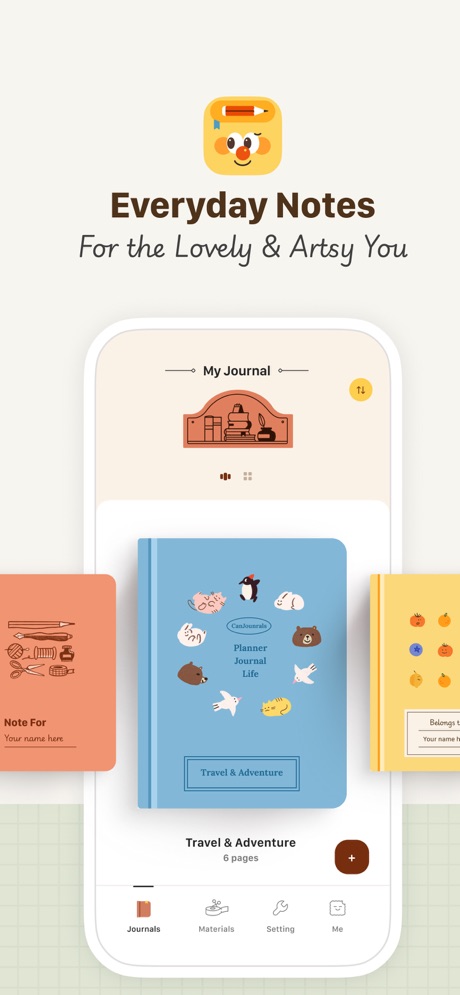
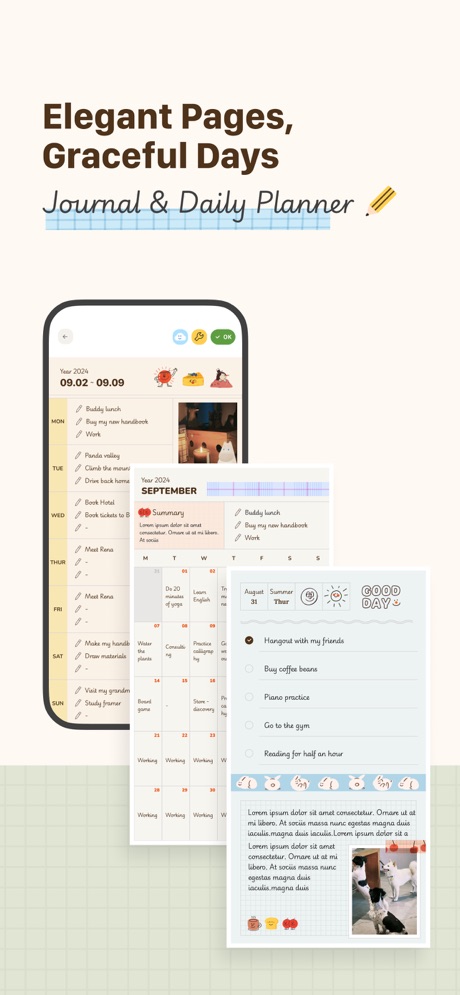
Most journal apps do one thing well — either a diary, a planner, or a mood tracker. CanJournals connects all three in a single app that actually looks like a journal. Open it and you see a warm, creative workspace with block-based editing, not a sterile form to fill out.
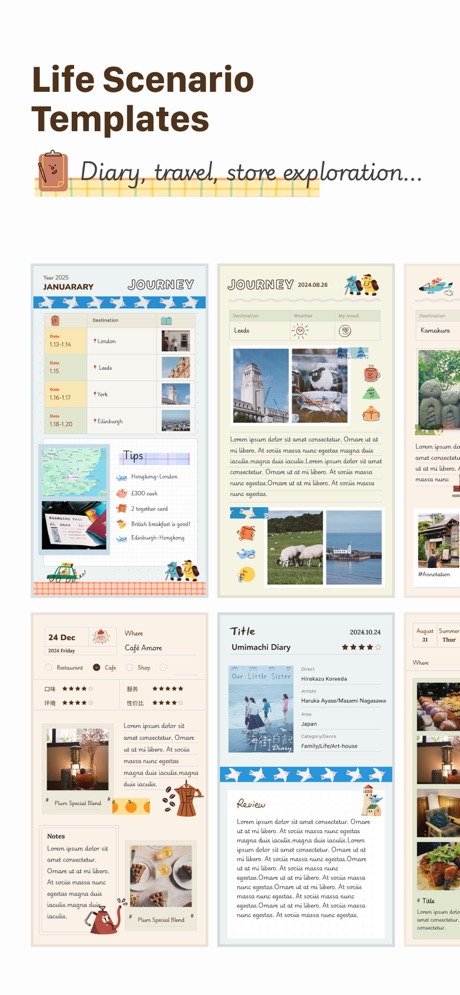
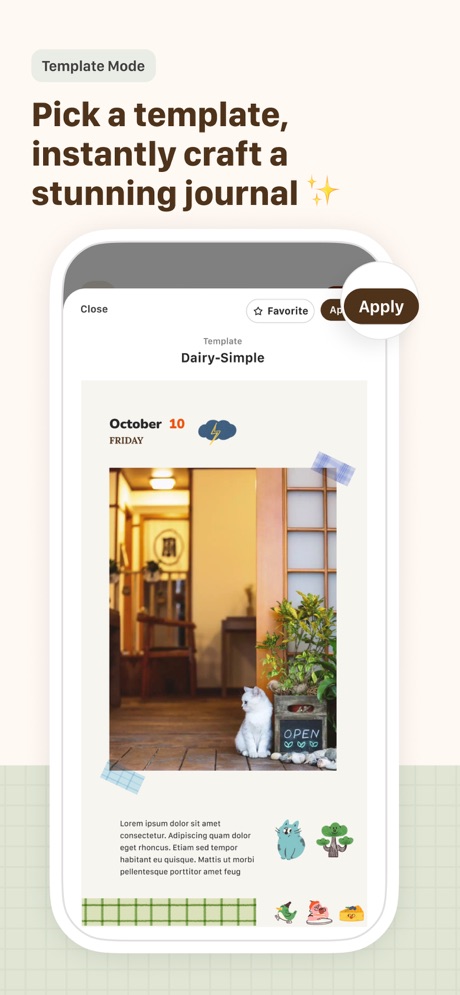
The editor is the star. Every page is a canvas where you add content blocks — text, images, stickers, habit widgets, mood selectors, and more — then arrange them however you like. Templates give you a head start: pick a daily journal layout, a weekly planner, or a mood tracker, and start writing in seconds.
What makes CanJournals different from a plain diary is the planning layer. Your journal entries connect to your weekly and monthly views. You can see that you wrote three entries last week, hit your reading goal four out of seven days, and that your mood trended upward over the month — all without opening a separate app.
What it does well:
- Block-based editor with aesthetic templates. Mix text, images, stickers, and widgets on every page. Over 200 templates cover daily journals, mood trackers, study planners, and gratitude logs — no design skills needed.
- Journal + planner + habit tracker in one app. No switching between three apps. Your diary entries, weekly plans, and habit streaks live in the same place with linked views.
- Rich stationery & sticker library. Hundreds of washi tapes, stickers, and covers that make every page feel like a real scrapbook. New packs added monthly.
- Cross-device sync with iCloud. Start a journal on your iPhone, continue on iPad with Apple Pencil, review on Mac. Everything stays in sync.
Where it falls short:
- Apple ecosystem only. Currently available on iPhone, iPad, and Mac. No Android or web version yet. If you need cross-platform, Journey or Day One are better options.
- Newer app, growing community. CanJournals launched in 2024. The App Store rating is excellent, but it doesn't have the years of user feedback that Day One has accumulated.
Pricing: Free (optional Pro upgrade)
Platforms: iPhone, iPad, Mac (Apple Silicon)
Bottom line: If you want a journal app that also handles planning, habit tracking, and mood logging — all wrapped in a beautiful, creative interface — download CanJournals from the App Store. Download CanJournals from the App Store
Day One has been the gold standard for digital journaling for over a decade. It won Apple's App of the Year, and for good reason: the writing experience is exceptional. Open the app, start typing, and everything else fades away.
The interface is clean and elegant — no stickers, no widgets, no templates. Just you and your words. For people who treat journaling as a writing practice rather than a creative project, that simplicity is a feature, not a limitation.
Day One also takes privacy seriously. End-to-end encryption means your entries are scrambled on your device before they ever reach the cloud. For a journal that might contain your most personal thoughts, that matters.
What it does well:
- Best-in-class writing experience. Clean, distraction-free editor with Markdown support. The focus is on your words, not on decoration or layout.
- End-to-end encryption. Your entries are encrypted on device before syncing. Even Day One's servers can't read your journals.
- Rich media entries. Attach photos, videos, audio recordings, and location data to any entry. Automatic metadata logging (weather, location, activity).
- Cross-platform sync. Available on iOS, iPadOS, macOS, Android, and web. Your journals follow you everywhere.
Where it falls short:
- No planning or habit features. Day One is a diary, not a planner. If you want habit tracking, templates, or weekly views, you'll need another app.
- Premium required for core features. Multiple journals, unlimited photo storage, and audio entries are locked behind the $34.99/year subscription.
Pricing: Free (Premium: $34.99/year)
Platforms: iPhone, iPad, Mac, Android, Web
Bottom line: Day One is the best pure diary app. If you just want to write — no decoration, no templates, no planning — this is the one.
If you live across Apple and Android devices — or switch between a phone and a Windows laptop — Journey is the only journal app that truly works everywhere. It syncs through Google Drive, so you're not locked into any proprietary cloud.
The journaling experience is solid. Rich text editing, photo and video attachments, location tagging, and a clean interface that gets out of your way. Journey also includes guided prompts for gratitude journaling, which is a nice touch for beginners.
Where Journey falls short is personality. The interface is functional but feels more like a productivity tool than a creative space. If the aesthetic of your journal matters to you, CanJournals offers a warmer, more personal experience.
What it does well:
- True cross-platform. iOS, Android, macOS, Windows, and web. Your journals sync everywhere through Google Drive — no proprietary cloud lock-in.
- Rich media support. Photos, videos, audio clips, and location tagging. Each entry can be a multimedia snapshot of your day.
- Gratitude-focused prompts. Built-in prompts encourage gratitude journaling and reflection, backed by positive psychology research.
Where it falls short:
- Design feels utilitarian. The interface works well but lacks the warmth and personality of CanJournals or the polish of Day One.
- No planning or habit features. Like Day One, Journey is focused on journaling. No weekly planners, habit trackers, or templates.
Pricing: Free (Premium: $29.99/year)
Platforms: iOS, Android, Mac, Windows, Web
Bottom line: Journey is the best choice for people who need their journal on every platform. If you're all-Apple and want a more creative experience, look at CanJournals instead.
Reflectly is not a traditional journal — it's an AI-powered mental wellness companion. Instead of staring at a blank page, you get personalized prompts that adapt based on your mood patterns and past entries.
The app uses cognitive behavioral therapy (CBT) and positive psychology to guide your reflections. Over time, it builds a picture of your mental health trends and offers insights you might miss on your own.
For people who struggle with the "what do I write?" problem, Reflectly's guided approach is genuinely helpful. But if you want creative freedom — adding stickers, arranging layouts, tracking habits alongside your journal — CanJournals gives you that flexibility that Reflectly deliberately removes.
What it does well:
- AI-powered prompts. Reflectly learns from your entries and generates personalized questions that go deeper over time.
- Mood tracking with insights. Log your mood daily and see correlations with activities, sleep, and other factors through clean visualizations.
- CBT and mindfulness based. Built on cognitive behavioral therapy and positive psychology principles. More than just a diary — it's a mental wellness tool.
Where it falls short:
- Expensive subscription. At $47.99/year, Reflectly Premium is one of the priciest journal apps. The free tier is very limited.
- No free-form journaling. You answer prompts rather than writing freely. If you want an open canvas, this feels restrictive.
- No planning features. Reflectly is focused on mental wellness, not productivity. No planners, habit trackers, or weekly views.
Pricing: Free (Premium: $47.99/year)
Platforms: iPhone, iPad, Mac, Android
Bottom line: Reflectly is the best journal for people who want guided, AI-driven mental wellness reflections. For creative, free-form journaling, look elsewhere.
The Five Minute Journal started as a physical notebook and became one of the most popular gratitude tools in the world. The app translates that exact framework to your phone: every morning, list three things you're grateful for and what would make today great. Every evening, reflect on three amazing things that happened.
It works. The structure removes decision fatigue, and the time commitment is genuinely minimal. For building a daily gratitude habit, nothing is simpler.
But the rigidity is also the limitation. If you ever want to write more freely, track a habit, plan your week, or add a creative element to your journaling, the Five Minute Journal can't accommodate that. CanJournals includes gratitude templates within a much more flexible system.
What it does well:
- Proven gratitude framework. Based on the bestselling physical Five Minute Journal by Intelligent Change. The morning and evening prompts are grounded in positive psychology.
- Quick and easy. Complete your daily entry in under 5 minutes. Perfect for people who want a journaling habit without the time commitment.
- Photo entries. Attach a daily photo to capture moments alongside your gratitude lists.
Where it falls short:
- Very rigid format. You fill in the same prompts every day: three gratitudes, what would make today great, daily affirmation. No room for free-form writing.
- No planning or habit features. This is a gratitude tool, not a planner or habit tracker. You'll need separate apps for those.
- Limited customization. You can't change the prompt structure, add custom sections, or design your own layouts.
Pricing: Free (Premium: $19.99/year)
Platforms: iPhone, iPad, Android
Bottom line: The Five Minute Journal is the simplest way to start a daily gratitude practice. If you want more flexibility, use CanJournals with its gratitude templates instead.
Grid Diary takes a unique approach: instead of a blank page, each entry is a grid of prompted questions. You might have cells for "What am I grateful for?", "What did I learn today?", and "How am I feeling?" — each one a small, manageable writing task.
This structure works well for people who want reflection without the pressure of writing full paragraphs. The prompt library is extensive, covering everything from daily check-ins to CBT exercises for anxiety.
Grid Diary also includes basic habit tracking and goal setting, which puts it a step ahead of pure diary apps like Day One. But it doesn't offer the creative flexibility of CanJournals — no custom layouts, no sticker library, no scrapbook-style pages.
What it does well:
- Unique grid format. Each journal entry is a grid of prompted questions. Fill in as many or as few cells as you want. Structure without rigidity.
- CBT-inspired prompts. Built-in prompt library covers self-reflection, stress management, personal growth, and mindfulness.
- Habit and goal tracking. Track habits alongside your journal entries. Set goals and review progress in the same app.
Where it falls short:
- Grid format can feel limiting. If you want to write long-form entries or arrange content freely, the grid cells constrain you.
- Design is functional, not creative. The interface is clean but utilitarian. No stickers, washi tapes, or aesthetic customization.
Pricing: Free (Premium: $29.99/year)
Platforms: iPhone, iPad, Mac, Android
Bottom line: Grid Diary is the best structured journal for people who like prompted questions. For more creative freedom, try CanJournals.
Daylio proves that you don't need to write to keep a journal. Open the app, tap your mood (rad, good, meh, bad, awful), select your activities (work, exercise, friends, food), and you're done. The whole process takes five seconds.
Over time, Daylio builds a detailed picture of your emotional patterns. The statistics page shows which activities correlate with better moods, how your mood trends over months, and whether you're hitting your goals.
It's incredibly effective for what it does. But it's not a journal in the traditional sense — there's no writing, no photos, no creative expression. If you want the mood tracking plus actual journaling, CanJournals includes mood widgets within a full journaling app.
What it does well:
- Zero writing required. Tap your mood, select activities, and you're done. The lowest barrier to journaling of any app on this list.
- Excellent statistics. Beautiful charts showing mood trends, activity correlations, and streaks over weeks and months.
- Highly customizable. Create your own mood labels, activity categories, and goals. Make it yours.
Where it falls short:
- Not a real journal. If you want to write paragraphs, add photos, or create pages, Daylio can't do that. It's a mood tracker with optional notes.
- No creative features. No templates, no stickers, no visual customization. Just icons and charts.
Pricing: Free (Premium: $23.99/year)
Platforms: iPhone, iPad, Android
Bottom line: Daylio is the best mood tracker for people who hate writing. For a complete journal with mood tracking included, use CanJournals.
Final Verdict
The best journal app is the one you keep using. That means it needs to make you want to open it — not just remind you that you should. It should feel personal, not clinical. Flexible, not rigid.
Here's the short version:
- If you want the best all-in-one journal and planner: pick CanJournals.
- If you want the best pure writing diary: pick Day One.
- If you need true cross-platform support: pick Journey.
- If you want AI-guided mental wellness: pick Reflectly.
- If you only want a 5-minute gratitude habit: pick 5 Minute Journal.
- If you like structured, prompted journaling: pick Grid Diary.
- If you want to track mood without writing: pick Daylio.
Pick one and use it for two weeks before judging. The biggest journaling killer is often not the wrong app, but the app-hopping that keeps you from writing a single entry.
If you want one app that covers creative journaling, planning, and habit tracking, download CanJournals. It's the most complete option in this list and the easiest place to start if you want a better journaling habit today.